
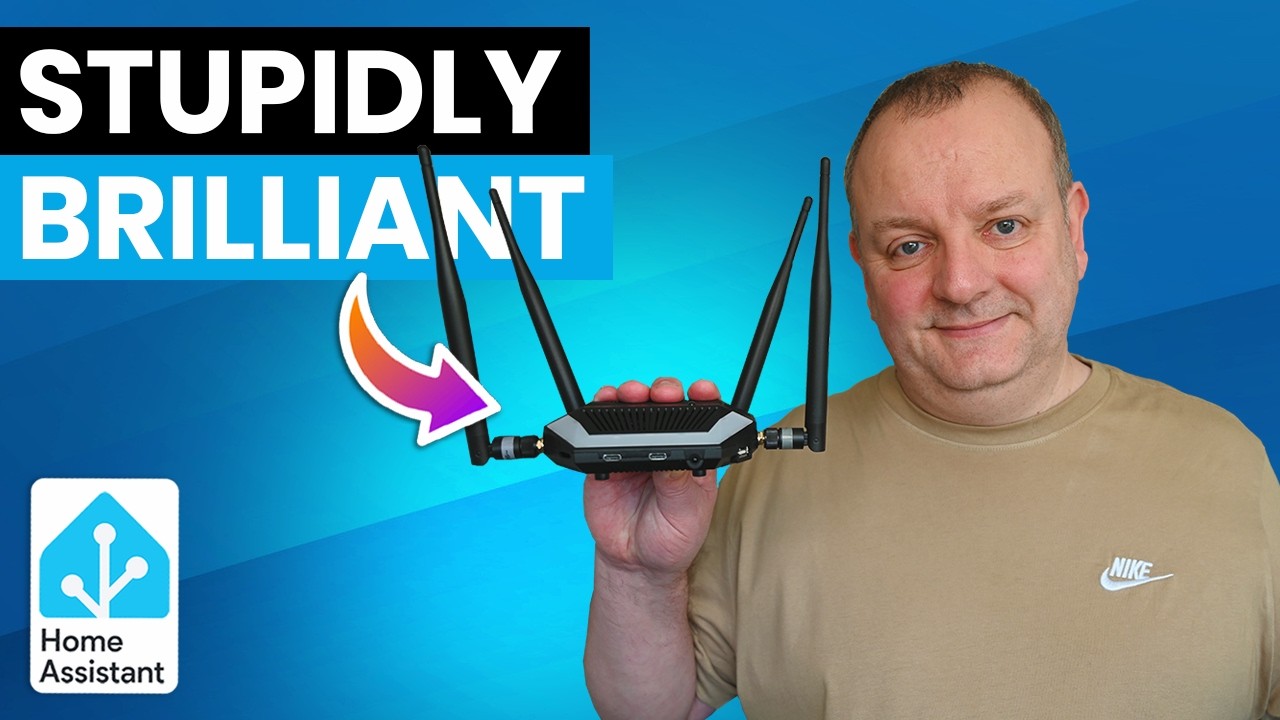
If you’ve been running a smart home for any length of time, you’ve probably accumulated a drawer full of single-purpose hubs, dongles, and gateways. One box for Zigbee, another for Thread, a separate adapter for Bluetooth, and yet another device to bridge everything together. It’s cluttered, inefficient, and frankly exhausting to manage. But what if one device could replace them all?
Enter the SMLight Ultima—a multi-radio smart home adapter that promises to consolidate your entire setup into a single, feature-packed unit. Supporting Thread, Zigbee, Z-Wave, and even infrared control, this device might just be the most overengineered (in the best possible way) smart home gadget available today.
What Makes the SMLight Ultima Special?
The Ultima isn’t just another smart home hub. It’s a comprehensive solution designed with expandability and versatility at its core. Right out of the box, you get built-in support for Zigbee, Matter over Thread, Wi-Fi, and Bluetooth. But the real magic lies in its modular design, which allows you to add functionality based on your specific needs.
The device itself is surprisingly compact—roughly the size of a standard USB hub—with a plastic casing featuring extensive ventilation to keep temperatures low during operation. During testing, the unit barely got warm, which speaks to its efficient thermal design.
Unboxing and First Impressions
Inside the box, you’ll find the adapter along with antennas for each built-in radio. The top of the unit houses various buttons, status LEDs, an IR transmitter, and a multicolored LED strip. The front features a couple of USB-C ports and an IR receiver, while the sides accommodate optional modules like a microphone or USB-A port.
The base includes an expansion connection (potentially for UPS functionality), and the rear sports another USB-C port, an RJ45 Ethernet port, an audio jack, and two antenna connections. It’s clear that SMLight designed this with serious enthusiasts in mind.
Modular Expansion: The Real Game-Changer
What sets the Ultima apart from competitors is its modular expansion capability. You can add various modules depending on your requirements:
- 4G Module: Install a SIM card to use cellular connectivity as either a primary or backup connection—perfect for remote installations or temporary setups without Wi-Fi access.
- Z-Wave Module: For those still using Z-Wave devices in their smart home ecosystem, this module seamlessly integrates that protocol into the Ultima.
- PoE Module: Power over Ethernet support keeps cabling tidy and simplifies installation, especially if you’re already using PoE for other network devices.
Each module comes with its appropriate antenna, and when fully loaded, the Ultima sports four antennas in total—a testament to its multi-protocol ambitions.
Installation: The Good and the Bad
Installing the add-on modules requires disassembling the device, which is where things get slightly concerning. The instructions direct you to insert a flat screwdriver between the front USB-C port and the case, then slide the cover off while pressing down. This method feels prone to user error and could easily result in scratched plastic, cracked cases, or even damaged USB ports.
A simple solution would have been to include four screws on the bottom of the case—a small design oversight on an otherwise well-engineered product. Once inside, however, the main board is beautifully laid out with everything clearly marked, making module installation straightforward.
The modules can only be installed one way and in their designated spaces. You simply align the holes with the pins on the main board and push down. After routing the antenna wires and feeding connections through the case holes, you’re ready to reassemble.
A Small SIM Card Quirk
One minor issue: if you install both the 4G and PoE modules, you’ll need to insert your SIM card before reassembling the case, as the slot becomes inaccessible afterward. It’s not a dealbreaker, but the slot would have been better positioned on the back or base of the case.
The Control Panel: Feature-Rich and Intuitive
Once powered up via Ethernet, the Ultima appears immediately on your network with an extensive control panel similar to other SMLight products. The dashboard displays general information about radio connectivity and chip temperatures at a glance.
The device achieves its multi-radio capabilities by using different chipsets for each radio:
- Radio 1: Silicon Labs EFR32 MG24—can function as a Zigbee router coordinator or Matter over Thread radio
- Radio 2: Texas Instruments CC2674P10—offers the same options as Radio 1, plus the ability to be configured as a Zigbee hub
- Radio 3: Silicon Labs EFR32 ZG23—dedicated to Z-Wave (currently marked as prototype while undergoing certification)
You can also set up a Bluetooth proxy via the onboard ESP32 chip and enable an Ethernet-to-Wi-Fi bridge if needed.
Standalone Zigbee Hub Mode
An interesting feature is the Zigbee hub option on the second radio. This allows the device to run its own Zigbee network directly without requiring an external computer to host the Zigbee stack. It’s perfect for building a self-contained setup or reducing complexity in your hardware and software configuration.
Additional Features Worth Noting
Beyond the wireless protocols, the Ultima packs in several bonus features:
- Infrared Control: Built-in IR transmitter and receiver let you capture commands from remote controls and replay them through Home Assistant automations
- Buzzer Notifications: Use REST commands to trigger audio alerts
- Ambient LED Lighting: Controllable color and effects—ideal for visual notifications
- WireGuard VPN: Built-in support for secure remote access
- Dynamic DNS: Alternative remote access method
- Scripts and Automations: Automate the adapter using Berry scripting language
Home Assistant Integration
At the time of testing, the SMLight integration doesn’t yet support the Ultima, though that’s expected to change as the device is brand new. However, you can still use it with Home Assistant—you just won’t have access to all features and entities yet.
Setting up one of the Zigbee radios via ZHA worked flawlessly, with Aqara buttons and generic Zigbee plugs pairing and functioning without issues. The infrared transmitter also performed well, though the transmission angle isn’t particularly wide, so placement matters if you plan to use this feature extensively.
Who Should Buy the SMLight Ultima?
The Ultima is an excellent choice for smart home enthusiasts who:
- Use multiple protocols (Zigbee, Thread, Z-Wave) and want to consolidate hardware
- Need remote or cellular connectivity for installations
- Want expandability without paying for features they won’t use
- Appreciate overengineered solutions that push boundaries
It’s staggering how much functionality SMLight has crammed into such a compact unit. For the price—starting at just £44 for the base unit, or £76 fully loaded with 4G, Z-Wave, and PoE modules—the value proposition is compelling.
Final Verdict
The SMLight Ultima represents an ambitious step forward in smart home hardware consolidation. While the case disassembly method could use improvement and the SIM slot placement is less than ideal, these are minor quibbles in an otherwise impressive package.
If you’re tired of managing multiple adapters and want a future-proof solution that can grow with your needs, the Ultima deserves serious consideration. It’s a promising product that delivers substantial benefits for those who need this level of functionality—and when full Home Assistant integration arrives, it’s only going to get better.
This post was generated automatically using LLM.
You can watch the full video from the link below.
“`